
Toast เป็นคอมโพเนนต์ใน Bootstrap 4 ที่ใช้แสดงข้อความแจ้งเตือน (Notification) อย่างเรียบง่ายและสามารถแสดงผลได้ทันทีบนหน้าเว็บโดยไม่ทำให้ผู้ใช้ต้องมีการโต้ตอบแบบซับซ้อน Toast ถูกออกแบบมาให้แสดงข้อความแบบชั่วคราวและหายไปเองเมื่อเวลาผ่านไป
โครงสร้างพื้นฐานของ Toast
โครงสร้างของ Toast ประกอบไปด้วย div ที่มี class .toast และส่วนประกอบย่อยอีกหลายส่วน เช่น header, body และปุ่มปิด
<div class="toast" data-autohide="false">
  <div class="toast-header">
    <strong class="mr-auto">Bootstrap Toast</strong>
    <small>11 mins ago</small>
    <button type="button" class="ml-2 mb-1 close" data-dismiss="toast">×</button>
  </div>
  <div class="toast-body">
    This is a Bootstrap Toast example!
  </div>
</div>
<script>
  $(document).ready(function(){
    $('.toast').toast('show');
  });
</script>
ในตัวอย่างนี้ จะเห็นว่า Toast มีทั้ง header และ body ที่แยกกันอย่างชัดเจน และมีปุ่มปิดที่ผู้ใช้สามารถกดปิดได้

การใช้งาน Toast แบบอัตโนมัติ
Toast สามารถตั้งค่าให้แสดงผลและหายไปเองโดยอัตโนมัติได้ โดยไม่ต้องกดปิด
<div class="toast" data-delay="5000">
  <div class="toast-header">
    <strong class="mr-auto">Auto Hide Toast</strong>
    <small>Just now</small>
    <button type="button" class="ml-2 mb-1 close" data-dismiss="toast">×</button>
  </div>
  <div class="toast-body">
    This toast will disappear after 5 seconds.
  </div>
</div>

<script>
  $(document).ready(function(){
    $('.toast').toast('show');
  });
</script>
ในตัวอย่างนี้ data-delay="5000" ถูกใช้เพื่อกำหนดเวลาที่ Toast จะแสดงผล 5 วินาทีก่อนหายไปเองโดยอัตโนมัติ
การใช้งาน Toast หลายอันพร้อมกัน
เราสามารถแสดง Toast หลายอันพร้อมกันได้ โดยจัดวาง Toast ในโครงสร้าง div เดียวกัน และใช้ jQuery เรียกใช้งานการแสดงผลทีละ Toast
<div class="toast-container">
  <div class="toast" data-delay="3000">
    <div class="toast-header">
      <strong class="mr-auto">Toast 1</strong>
      <small>Just now</small>
      <button type="button" class="ml-2 mb-1 close" data-dismiss="toast">×</button>
    </div>
    <div class="toast-body">
      First Toast is here!
    </div>
  </div>

  <div class="toast" data-delay="4000">
    <div class="toast-header">
      <strong class="mr-auto">Toast 2</strong>
      <small>2 seconds ago</small>
      <button type="button" class="ml-2 mb-1 close" data-dismiss="toast">×</button>
    </div>
    <div class="toast-body">
      Second Toast is here!
    </div>
  </div>
</div>

<script>
  $(document).ready(function(){
    $('.toast').toast('show');
  });
</script>
การแสดง Toast ในตำแหน่งต่างๆ บนหน้าจอ
เราสามารถใช้ CSS ปรับตำแหน่งของ Toast ในหน้าจอ เช่น แสดงที่มุมขวาบนของหน้าจอ
<div style="position: absolute; top: 0; right: 0;">
  <div class="toast" data-delay="3000">
    <div class="toast-header">
      <strong class="mr-auto">Positioned Toast</strong>
      <small>5 mins ago</small>
      <button type="button" class="ml-2 mb-1 close" data-dismiss="toast">×</button>
    </div>
    <div class="toast-body">
      This Toast is shown at the top right of the screen.
    </div>
  </div>
</div>

<script>
  $(document).ready(function(){
    $('.toast').toast('show');
  });
</script>
การใช้งาน Toast ในรูปแบบต่างๆ
Toast แจ้งเตือน (Warning Toast): สามารถใช้สีแตกต่างกันใน header หรือ body เพื่อแสดงข้อความเตือน เช่น ใช้สีเหลืองสำหรับคำเตือน สีแดงสำหรับข้อผิดพลาด
<div class="toast" data-delay="5000">
  <div class="toast-header bg-warning text-dark">
    <strong class="mr-auto">Warning Toast</strong>
    <small>5 mins ago</small>
    <button type="button" class="ml-2 mb-1 close" data-dismiss="toast">×</button>
  </div>
  <div class="toast-body">
    This is a warning message.
  </div>
</div>
<script>
  $(document).ready(function(){
    $('.toast').toast('show');
  });
</script>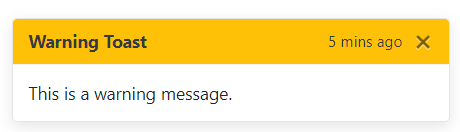
Toast สำหรับแสดงข้อความสำเร็จ (Success Toast): ใช้สีเขียวเพื่อแสดงผลลัพธ์สำเร็จ
<div class="toast" data-delay="4000">
  <div class="toast-header bg-success text-white">
    <strong class="mr-auto">Success Toast</strong>
    <small>Just now</small>
    <button type="button" class="ml-2 mb-1 close" data-dismiss="toast">×</button>
  </div>
  <div class="toast-body">
    The operation was successful!
  </div>
</div>
<script>
  $(document).ready(function(){
    $('.toast').toast('show');
  });
</script>
สรุป
Toast ใน Bootstrap 4 เป็นเครื่องมือที่ใช้งานง่ายและมีความยืดหยุ่น สามารถปรับแต่งให้เหมาะสมกับการใช้งานที่หลากหลาย เช่น การแจ้งเตือนสถานะการทำงาน ข้อความเตือน หรือข้อมูลที่ต้องการแสดงชั่วคราว เพียงแค่ใส่โครงสร้างพื้นฐานและกำหนดค่าต่างๆ เท่านี้ก็สามารถแสดง Toast ได้ในหลายรูปแบบ