
แท็ก <output> ใน HTML5 ถูกใช้เพื่อแสดงผลลัพธ์ของการคำนวณหรือการกระทำของผู้ใช้ในแบบฟอร์ม มักใช้ร่วมกับองค์ประกอบแบบฟอร์มเช่น <input>, <select> หรือ <textarea> โดยปกติจะใช้ JavaScript เพื่ออัปเดตค่าผลลัพธ์ตามอินพุตของผู้ใช้หรือผลการคำนวณอย่างไดนามิก
ไวยากรณ์พื้นฐาน
HTML
<output name="result" id="result">ค่าดีฟอลต์</output>แท็ก <output> มีแอตทริบิวต์หลายอย่างที่สามารถใช้งานได้
for: ระบุ ID ขององค์ประกอบที่ค่าของมันถูกใช้ในการคำนวณเพื่อแสดงผลname: อนุญาตให้ส่งผลลัพธ์ไปพร้อมกับการส่งแบบฟอร์ม เช่นเดียวกับแท็ก<input>id: ใช้เพื่อระบุตัวองค์ประกอบสำหรับการจัดสไตล์และการเขียนสคริปต์
ตัวอย่างที่ 1: การคำนวณอย่างง่าย
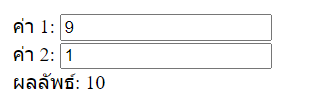
ตัวอย่างนี้แสดงให้เห็นว่าเราสามารถใช้แท็ก <output> เพื่อแสดงผลลัพธ์ของการคำนวณการบวกอย่างง่าย เมื่อผู้ใช้ป้อนค่าเข้าไป
HTML
<!DOCTYPE html>
<html lang="th">
<head>
    <meta charset="UTF-8">
    <meta name="viewport" content="width=device-width, initial-scale=1.0">
    <title>ตัวอย่าง Output</title>
</head>
<body>
    <form oninput="result.value=parseInt(a.value)+parseInt(b.value)">
        <label for="a">ค่า 1:</label>
        <input type="number" id="a" name="a" value="0">
        <br>
        <label for="b">ค่า 2:</label>
        <input type="number" id="b" name="b" value="0">
        <br>
        <label for="result">ผลลัพธ์:</label>
        <output name="result" id="result">0</output>
    </form>
</body>
</html>- ผู้ใช้สามารถป้อนตัวเลขในฟิลด์อินพุตสองฟิลด์ (
aและb) - ผลลัพธ์ของการบวกค่าทั้งสองจะแสดงในแท็ก
<output>แบบเรียลไทม์ โดยที่ไม่ต้องกดปุ่มส่งแบบฟอร์ม
ตัวอย่างที่ 2: การใช้ for ในแท็ก <output>
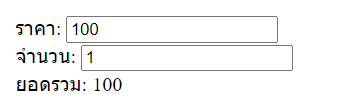
เราสามารถใช้แอตทริบิวต์ for เพื่อระบุว่าผลลัพธ์มาจากองค์ประกอบใดบ้าง ตัวอย่างเช่น
HTML
<!DOCTYPE html>
<html lang="th">
<head>
    <meta charset="UTF-8">
    <meta name="viewport" content="width=device-width, initial-scale=1.0">
    <title>ตัวอย่าง Output</title>
</head>
<body>
    <form>
        <label for="price">ราคา:</label>
        <input type="number" id="price" name="price" value="100">
        <br>
        <label for="quantity">จำนวน:</label>
        <input type="number" id="quantity" name="quantity" value="1">
        <br>
        <label for="total">ยอดรวม:</label>
        <output for="price quantity" id="total">100</output>
    </form>

    <script>
        const priceInput = document.getElementById('price');
        const quantityInput = document.getElementById('quantity');
        const totalOutput = document.getElementById('total');

        function calculateTotal() {
            const price = parseFloat(priceInput.value);
            const quantity = parseInt(quantityInput.value);
            totalOutput.value = price * quantity;
        }

        priceInput.addEventListener('input', calculateTotal);
        quantityInput.addEventListener('input', calculateTotal);
    </script>
</body>
</html>- แอตทริบิวต์
for="price quantity"ถูกใช้เพื่อระบุว่าแท็ก<output>จะแสดงผลลัพธ์ตามค่าอินพุตจากทั้งสองฟิลด์ (priceและquantity) - เมื่อผู้ใช้ป้อนค่าในฟิลด์ใดฟิลด์หนึ่ง ฟังก์ชัน
calculateTotal()จะทำการคำนวณยอดรวมและอัปเดตค่าใน<output>
ตัวอย่างที่ 3: ใช้ในแบบฟอร์มเพื่อส่งค่า
แท็ก <output> ยังสามารถถูกส่งไปพร้อมกับการส่งแบบฟอร์ม เช่นเดียวกับฟิลด์ <input> โดยการใช้แอตทริบิวต์ name ดังนี้
HTML
<!DOCTYPE html>
<html lang="th">
<head>
    <meta charset="UTF-8">
    <meta name="viewport" content="width=device-width, initial-scale=1.0">
    <title>ตัวอย่าง Output</title>
</head>
<body>
    <form action="submit-result.php" method="post">
        <label for="length">ความยาว (เมตร):</label>
        <input type="number" id="length" name="length" value="1">
        <br>
        <label for="width">ความกว้าง (เมตร):</label>
        <input type="number" id="width" name="width" value="1">
        <br>
        <label for="area">พื้นที่ (ตารางเมตร):</label>
        <output name="area" id="area">1</output>
        <br>
        <button type="submit">ส่งแบบฟอร์ม</button>
    </form>

    <script>
        const lengthInput = document.getElementById('length');
        const widthInput = document.getElementById('width');
        const areaOutput = document.getElementById('area');

        function calculateArea() {
            const length = parseFloat(lengthInput.value);
            const width = parseFloat(widthInput.value);
            areaOutput.value = length * width;
        }

        lengthInput.addEventListener('input', calculateArea);
        widthInput.addEventListener('input', calculateArea);
    </script>
</body>
</html>- เมื่อผู้ใช้ป้อนข้อมูลและส่งแบบฟอร์ม ค่าของ
<output>ที่คำนวณได้จะถูกส่งไปพร้อมกับข้อมูลของแบบฟอร์มไปยังเซิร์ฟเวอร์ - ค่าใน
<output>ถูกผูกกับname="area"เพื่อให้สามารถส่งไปพร้อมกับฟอร์มได้
สรุปการใช้งาน
<output>ใช้เพื่อแสดงผลลัพธ์ของการคำนวณหรือการกระทำของผู้ใช้ในแบบฟอร์ม- สามารถใช้งานร่วมกับ JavaScript เพื่ออัปเดตค่าผลลัพธ์แบบไดนามิก
- ใช้
forเพื่อระบุฟิลด์ที่มีผลต่อการคำนวณ - ใช้
nameเพื่อส่งค่าผลลัพธ์ไปพร้อมกับการส่งแบบฟอร์ม