การใช้งานฟอร์ม (Form) ใน HTML5 เป็นส่วนสำคัญในการรับข้อมูลจากผู้ใช้และส่งข้อมูลไปยังเซิร์ฟเวอร์ โดย HTML5 ได้เพิ่มคุณสมบัติใหม่ๆ ที่ทำให้การสร้างฟอร์มมีความยืดหยุ่นและง่ายขึ้น เราสามารถใช้ฟอร์มในหลายรูปแบบเพื่อเก็บข้อมูลได้หลากหลาย เช่น ข้อความ ตัวเลข วันที่ ไฟล์ และอื่นๆ
โครงสร้างพื้นฐานของฟอร์มใน HTML5
HTML
<form action="/submit" method="POST">
  <!-- ส่วนประกอบต่างๆ ของฟอร์มจะอยู่ภายในแท็ก <form> -->
</form>action: ระบุ URL ที่จะส่งข้อมูลเมื่อผู้ใช้กดส่งฟอร์มmethod: ระบุวิธีการส่งข้อมูล เช่นGETหรือPOST
ส่วนประกอบของฟอร์มใน HTML5
ช่องกรอกข้อความ (Text Input)
HTML
<label for="name">Name:</label>
<input type="text" id="name" name="name" required>type="text"ใช้สำหรับรับข้อมูลข้อความทั่วไปrequiredบังคับให้ผู้ใช้ต้องกรอกข้อมูล
ช่องกรอกอีเมล (Email Input)
HTML
<label for="email">Email:</label>
<input type="email" id="email" name="email" required>type="email"ตรวจสอบการป้อนข้อมูลว่าอยู่ในรูปแบบอีเมลหรือไม่
ช่องกรอกหมายเลข (Number Input)
HTML
<label for="age">Age:</label>
<input type="number" id="age" name="age" min="1" max="100">type="number"รับข้อมูลที่เป็นตัวเลขเท่านั้น- สามารถกำหนดค่าต่ำสุด (
min) และค่าสูงสุด (max) ได้
ช่องกรอกรหัสผ่าน (Password Input)
HTML
<label for="password">Password:</label>
<input type="password" id="password" name="password" required>type="password"ข้อมูลที่ผู้ใช้กรอกจะถูกซ่อนไว้
เลือกวันที่ (Date Input)
HTML
<label for="birthday">Birthday:</label>
<input type="date" id="birthday" name="birthday">type="date"เปิดตัวเลือกปฏิทินให้ผู้ใช้สามารถเลือกวันที่ได้ง่ายๆ
ช่องเลือกสี (Color Input)
HTML
<label for="favcolor">Favorite Color:</label>
<input type="color" id="favcolor" name="favcolor">type="color"เปิดเครื่องมือให้ผู้ใช้เลือกสี
ช่องเลือกไฟล์ (File Input)
HTML
<label for="file">Upload file:</label>
<input type="file" id="file" name="file">type="file"ให้ผู้ใช้เลือกและอัปโหลดไฟล์
ปุ่มเลือก (Radio Button)
HTML
<label for="gender">Gender:</label>
<input type="radio" id="male" name="gender" value="male">
<label for="male">Male</label>
<input type="radio" id="female" name="gender" value="female">
<label for="female">Female</label>type="radio"ให้ผู้ใช้เลือกหนึ่งตัวเลือกจากกลุ่มตัวเลือกหลายๆ ตัว
กล่องเช็ค (Checkbox)
HTML
<label for="subscribe">Subscribe to newsletter:</label>
<input type="checkbox" id="subscribe" name="subscribe" value="yes">type="checkbox"ให้ผู้ใช้เลือกหรือไม่เลือกตัวเลือกได้
รายการเลือก (Dropdown Select)
HTML
<label for="country">Country:</label>
<select id="country" name="country">
  <option value="thailand">Thailand</option>
  <option value="usa">USA</option>
  <option value="japan">Japan</option>
</select>- ใช้แท็ก
<select>เพื่อสร้างเมนูดรอปดาวน์
ปุ่มส่งฟอร์ม (Submit Button)
HTML
<input type="submit" value="Submit">type="submit"ใช้สำหรับส่งฟอร์มไปยังเซิร์ฟเวอร์
คุณสมบัติใหม่ใน HTML5 ที่น่าสนใจ
Autocomplete
HTML
<input type="text" name="name" autocomplete="on">- ช่วยให้เบราว์เซอร์สามารถเสนอข้อมูลที่เคยกรอกไว้แล้วให้กับผู้ใช้
Pattern Validation
HTML
<input type="text" name="username" pattern="[A-Za-z]{3,}" title="Only letters are allowed.">- ใช้
patternเพื่อตรวจสอบรูปแบบของข้อมูลที่กรอก
Placeholder
HTML
<input type="text" name="name" placeholder="Enter your name">- แสดงข้อความแนะนำในช่องกรอกข้อมูลก่อนที่ผู้ใช้จะพิมพ์
Multiple File Upload
HTML
<input type="file" name="files" multiple>- อนุญาตให้ผู้ใช้อัปโหลดไฟล์หลายไฟล์พร้อมกัน
ตัวอย่างการประยุกต์ใช้งานฟอร์ม
HTML
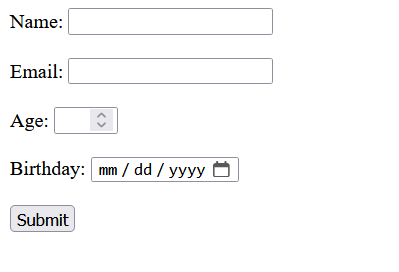
<form action="/submit" method="POST">
  <label for="name">Name:</label>
  <input type="text" id="name" name="name" required><br><br>

  <label for="email">Email:</label>
  <input type="email" id="email" name="email" required><br><br>

  <label for="age">Age:</label>
  <input type="number" id="age" name="age" min="18" max="99"><br><br>

  <label for="birthday">Birthday:</label>
  <input type="date" id="birthday" name="birthday"><br><br>

  <input type="submit" value="Submit">
</form>
ฟอร์มข้างต้นมีการรับข้อมูลที่หลากหลายและตรวจสอบความถูกต้องพื้นฐาน เช่น ตรวจสอบอีเมล การกำหนดช่วงอายุ และการกรอกข้อมูลที่จำเป็น